This article shows howto send images to Adobe Lightroom from a wireless connected device.
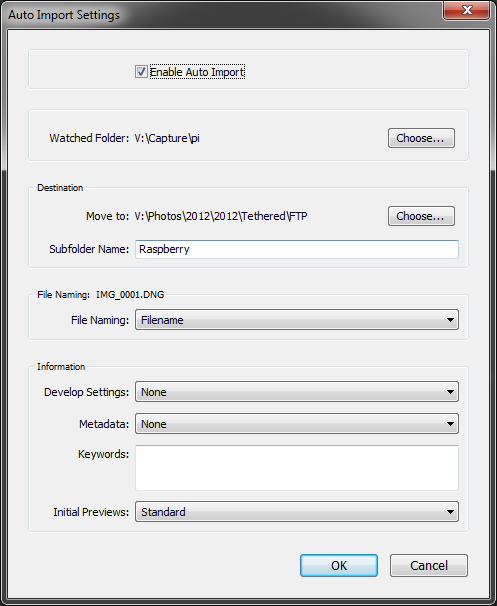
In the past, I’ve demonstrated sending images from my CameraPi (Raspberry Pi embedded into a Battery Grip) to my iPad using Shuttersnitch. This is an ideal job for Shittersnitch, as it has an FTP (File Transfer Protocol) server to which you can send images using an FTP client. However, I wanted to send images to Lightroom on my PC when I was working in my studio, so I looked at ways of getting images from my DSLR, through the CameraPi, transmitted wirelessly to the PC over FTP, and then auto-imported into Lightroom so we could review the images as we shoot. Lightroom does not have an FTP server built-in, but thankfully it does have an auto-import feature, where you can set it to “watch” a directory.
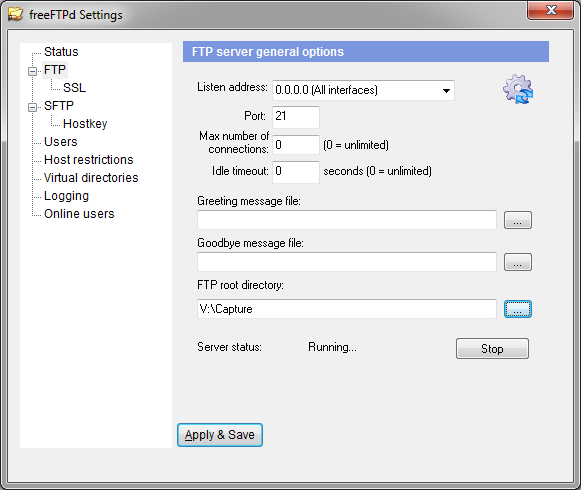
Next, I needed a quick and easy (and free) FTP server for windows. I found an ideal one in the form of freeFTPd, which is available for free download from the freeSSHd and freeFTPd website. Installation is quick and easy, and there’s just two steps in getting it up and running.
1. Enable the FTP server:
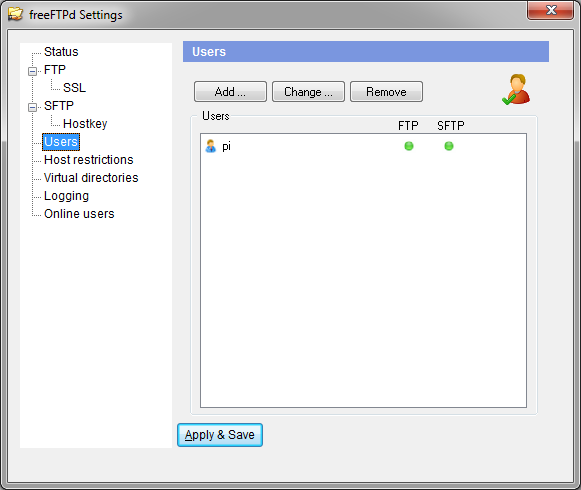
and two, set up a user so a remote ftp client can push images in:
Once, I’d set up Lightroom to look at the same directory as where the FTP server was saving images, I then opened an FTP client on my CameraPi, and ftp’d an image to my PC, and it appeared in Lightroom a few seconds later!
So now I’ll be able preview images using my iPad when out and about, and preview images on my PC when in the studio.
Raspberry Pi is a trademark of the Raspberry Pi Foundation
Fantastic
Did you use the USB connection from your camera to the Pi in order to do this?
USB from Camera to Raspberry Pi, then WiFi to desktop with Lightroom.
This intrugues me for my Technical camera – except that Phase One backs have Firewire ports rather than USB. Is there any way of substituting a Firewire port for one of the USB’s on the Rasberry? Thanks.
USB to firewire adapter, maybe?
I wish there was such a thing that worked. As far as I know, no mainstream manufacturer makes one and the ones available on eBay are cheap Chinese junk that doesn’t work.
A USB to Firewire adaptor is such an obvious product and the fact that a working one doesn’t seem to exist suggests technical issues are to blame.
If you know of a way, i’d love to hear it. Can the Rasbery Pi be adapted to replace a USB port with a fFrewire one, or is the circuitry wrong for that?
Be careful, FTP is not a very secure protocol. Its easy to use because its not secure.
I wold recommend that you only run the server when you want to tether the camera. And don’t run it when you have taken your laptop to Starbucks or the local pub.
Great work. But i wonder how long the time lapse time from the shutter pressed until the image pops on LR on the PC/ Laptop?